 Open full-size image ↗
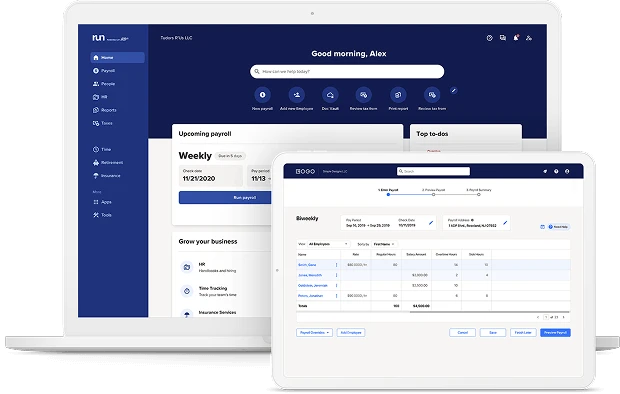
What to noticeThe vendor mockup pairs upcoming payroll on the home dashboard with a payroll entry table.
Try in your demoAsk the demo host to enter one payroll change, preview the totals and show how to correct it before submission.
Official device mockup with historical sample dates. The source image is limited to 620 pixels wide; use a live demo to inspect individual fields. Source: RUN Powered by ADP · Image checked September 23, 2026. Official example, not our test account.
01 / Your buying guide
RUN versus other ADP products
RUN is ADP's small business payroll product, for employers in the 1 to 49 range. Workforce Now is a separate ADP platform, so capabilities you read about there should not be assumed to sit inside a RUN quote.
Keep the evaluation focused on the product your team would actually use. Ask to see the quoted RUN package during your demo and save broader platform questions for a separate discussion.
- Ask the rep to confirm in writing that the proposal covers RUN and not Workforce Now.
- During the demo, ask which screens belong to the package you are actually being quoted.
- Decide what growth would push you to a larger ADP platform, then ask how that move works.
02 / Your buying guide
Packages and included support
All four packages, Essential, Enhanced, Complete Payroll & HR Plus and HR Pro Payroll & HR, list payroll, tax filing, employee access, onboarding, multi-jurisdiction payroll and 24/7 payroll support.
Use the package table below to identify the service level worth exploring. Choose the additional HR tools around recurring work, rather than buying the largest bundle by default.
- List the three HR tasks you currently handle by email, then ask which package covers them.
- Ask which support channels answer around the clock and which follow set hours.
- Ask whether the HR HelpDesk is separate from payroll help, and who answers each.
| Package | Useful distinctions | Demo focus |
|---|---|---|
| Essential Payroll | Payroll, tax filing and employee onboarding | Start with the core payroll workflow. |
| Enhanced Payroll | Adds SUI management, garnishment services and job costing | Ask which service removes a recurring task. |
| Complete Payroll & HR Plus | Adds HR HelpDesk and handbook tools | Bring a real HR question to the discussion. |
| HR Pro Payroll & HR | Adds applicant tracking and learning tools | Check the hiring and training scope you will use. |
All four list 24/7 payroll support. Confirm availability by channel and distinguish payroll support from HR advice. Time and attendance, retirement and insurance are add-ons. The official W-2/1099 description specifies an additional fee.
03 / Your buying guide
What shapes your quote
ADP publishes features rather than prices. Its FAQ says payroll fees increase with pay frequency, without naming an amount, and the package table marks W-2 and 1099 filing as an additional fee even where the row is checked.
Ask for a first-year total and a standard renewal-year total. That gives your finance owner a clear basis for discussing both recurring services and occasional charges.
- State your actual pay schedule and ask what an additional payroll run would cost.
- Request a separate line for year-end forms, per employee and per contractor.
- Ask which add-ons are firmly priced in the proposal and which are only estimates.
Your quote, on the same basis
Six lines to make the proposal clearer.
- Team
- Employees, contractors, states and entities
- Schedule
- Regular runs per year, expected off-cycle runs and payment speed
- Recurring fees
- Base, per-person, per-run and module fees; avoid counting a bundled item twice
- Annual extras
- Year-end forms, delivery and other separately quoted services
- First year
- Setup, data migration, training and any temporary discount
- Renewal
- Standard rate after the promotion and written cancellation terms
Use only the fee lines in your actual proposal. A blank price means unconfirmed, not zero. Compare subscription and service charges separately from wages, taxes and insurance premiums.
Download the quote request brief04 / Your buying guide
Payroll and onboarding workflows
RUN brings payroll, employee access and onboarding into the same product. ADP Assist can surface potential payroll errors; keep a human review step before approving payments.
Time and attendance sits outside the base packages, so ask early how approved hours reach a pay run if timesheets drive your payroll.
- Ask the demo to walk a correction end to end, so you see the off-cycle path and approvals.
- Have them show onboarding for a new hire in a second state.
- Ask what a manager sees versus an employee, and who may edit approved hours.
05 / Your buying guide
Migration checklist
ADP supports switching during the year. The transition schedule depends on the available data and services, so agree the first payroll date against your own calendar.
Ask for a provider approved transition checklist and settle, in writing, who files which quarter.
- Ask exactly which prior wage data is required for a clean full-year W-2.
- Agree a pre-launch reconciliation of payroll totals and name the person who signs off before funds move.
- Ask what happens to filings your outgoing provider has already submitted.
06 / Your buying guide
Where RUN belongs on your shortlist
Consider RUN if payroll assistance is an important part of your buying decision. Bring one ordinary pay run, one correction and one new hire to the demo, then ask the team to show the proposed package handling each scenario.
Compare Gusto if public subscription pricing is useful to your budget process. Explore Rippling if your decision also involves connecting HR and IT; these are different buying briefs, not automatic substitutes.
- Decide the maximum monthly total you would approve before the first sales call.
- Ask whether your current pay calendar is supported without an added fee.
- Mark which claims in any comparison came from a vendor page rather than a neutral source.
What customers say about ADP RUN.


Make your next conversation count
Bring a brief. Leave with a clear scope.
 Explore Gusto plans and calculator
  Compare Gusto and Rippling
 Still building your shortlist? Explore US payroll software.
Your questions, answered.
Is ADP RUN legit?
Yes. RUN Powered by ADP is an established small business payroll product from ADP, with packages, tax filing and support documented on ADP's own product pages.
Read the sourceWhat does an ADP run cost?
ADP quotes RUN rather than publishing a price. Its FAQ says fees increase with pay frequency, and W-2 and 1099 filing carries an additional fee, so ask for a written quote.
Read the sourceIs ADP RUN different from ADP Workforce Now?
Yes. RUN is the small business payroll product, while Workforce Now is a separate ADP platform. Do not assume Workforce Now capabilities appear in a RUN quote.
Read the source Additional referenceIs ADP RUN good for small business?
It is built for 1 to 49 employees, and every package lists payroll, tax filing, onboarding and 24/7 payroll support. Fit then depends on the HR depth you need.
Read the sourceWhat differs between the RUN packages?
Enhanced adds state unemployment insurance, garnishments and job costing. Complete adds an HR HelpDesk and handbook. HR Pro adds CareerPlug applicant tracking and learning.
Read the sourceWhich payroll services are included in a RUN quote?
Use the package comparison as a starting point, then confirm the exact services and fees in your written proposal. Availability does not always mean a service has no separate charge; year-end forms are one example.
Read the sourceDoes RUN support multistate payroll?
Multi-jurisdiction payroll is listed across the four packages. Name your specific states and local filings so the quote reflects them.
Read the sourceHow are time tracking and payroll connected?
Time and attendance is an add-on rather than a package inclusion, so ask the demo to show approved hours flowing into a funded pay run.
Read the sourceWhich support channels are included in each package?
All four list 24/7 payroll support, while the HR HelpDesk starts at Complete. Confirm hours channel by channel, and keep payroll help separate from HR advice.
Read the sourceWhat information is needed to switch to RUN?
ADP says a switch is possible at any time of year, with timing set by your data and scope. Prepare prior wages, filing history and a provider approved checklist.
Read the sourceWhat year-end and off-cycle costs should a buyer check?
W-2 and 1099 filing carries an additional fee, fees rise with pay frequency, and contractor billing includes year-end processing. Ask for each as its own line.
Read the sourceWhen should a small business compare RUN with Gusto?
When published per person pricing would speed up budgeting, or when a single state plan might cover you. Gusto lists Simple, Plus and Premium prices openly.
Read the sourceSources and method
Reviewed September 20, 2026. This guide examines official documentation and public pricing. Recommendations, demo questions and templates are editorial guidance. No customer account was tested and no savings or compliance outcome was measured.
Four FAQ questions came from People also ask observations in our September 19 US SERP and DataForSEO research. The other questions are editorial. This comparison concerns RUN, not every ADP product. Request current written terms for your company.
- www.adp.com · run powered by adp.aspx
- www.adp.com · payroll packages.aspx
- www.adp.com · switching to adp.aspx
- gusto.com · pricing