 Open full-size image ↗
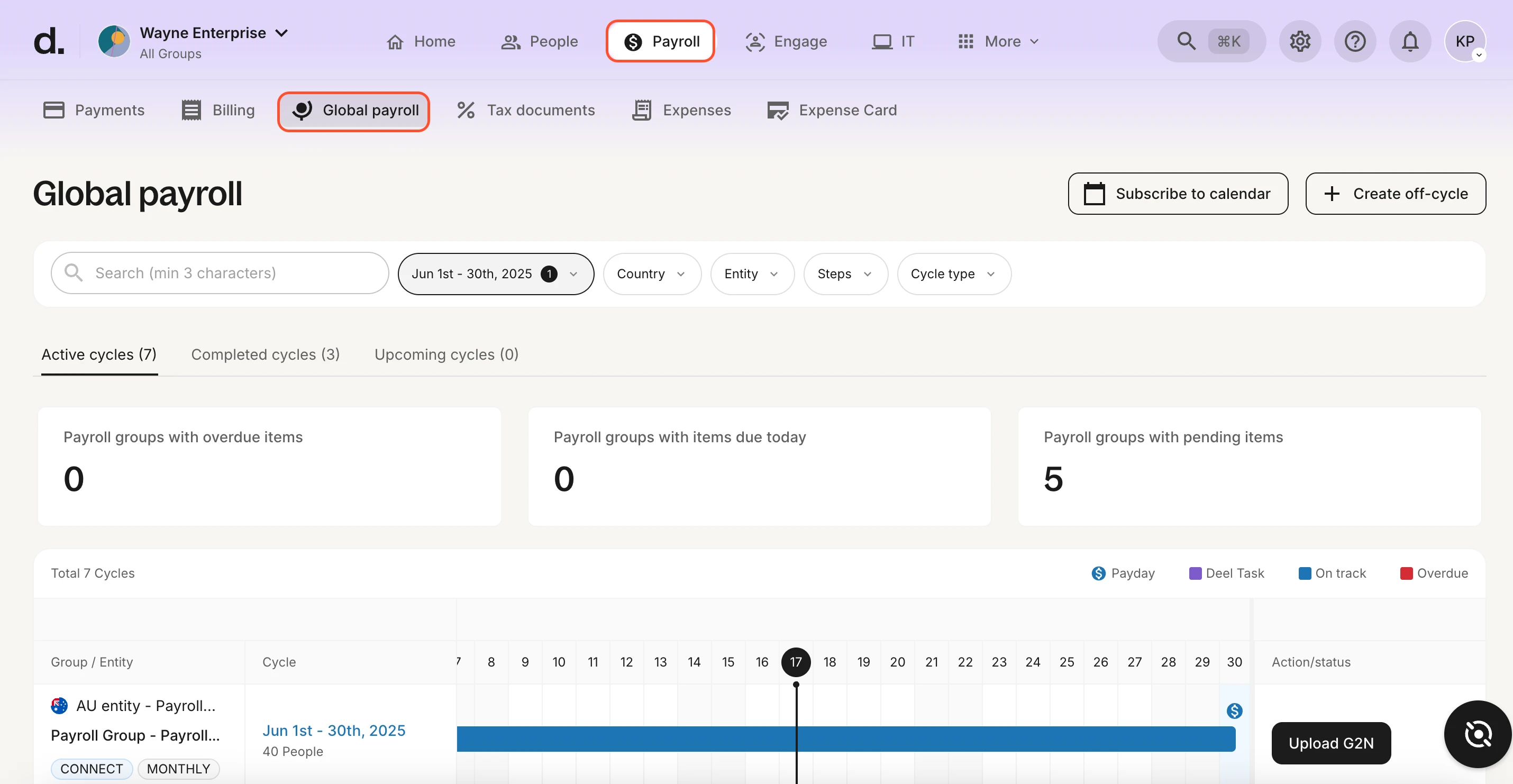
What to noticeCountry and entity filters sit above cycle tabs, pending items and a timeline.
Try in your demoAsk the demo host to open a pending item and show its owner and deadline.
Vendor documentation example showing a June 2025 cycle. This view illustrates Global Payroll, not every Deel service. Source: Deel payroll guide · Image checked September 23, 2026. Official example, not our test account.
Our take
Is Deel a good fit for your HR team?
Deel is worth exploring when your hiring plans cross borders. Its strongest appeal is the ability to organize different worker arrangements in one platform. Start with who you are hiring and whether you have a local entity. That decision gives you a more useful shortlist than comparing services as though they were upgrade tiers.
Bring your hiring countries, worker arrangements and existing entities. Ask Deel to map a service to each group, then walk through one complete hiring or payment cycle.
A global brief. A practical starting point.
What you want to improve
- You already work with contractors in several countries and want invoicing, approvals, and payouts in one portal instead of scattered transfers and spreadsheets.
- You want to hire an employee where you have no legal entity, and you accept an EOR service fee on top of salary, employer charges, and benefits.
- You operate your own entities and want to explore a shared payroll workspace across countries. Request a quote for your locations and service scope.
What to clarify first
- Ask for the full employment cost breakdown per country: salary, employer charges, benefits, the Deel fee, and any severance accrual, plus how FX and deposits are quoted.
- Confirm the exact countries and products you need. Coverage varies by product and country and some locations carry exclusions, so check your own list rather than a headline count.
- Read the contract terms that apply to your service and order, including notice, how contractor activity triggers billing, and the terms attached to any PEO promotional price.
Start with the working relationship
Which Deel service should you explore?
Use this map to prepare your shortlist. It helps you choose a conversation with Deel; it does not determine a worker’s legal classification.
Do you have a local entity?
- No local entity
- Explore Employer of Record.
- Own local entity
- Explore Global Payroll.
Who will manage the relationship?
- Your team
- Explore Contractor Management.
- Deel takes a contractual role
- Explore Contractor of Record and its scope.
Employment models: Deel’s contract guide
Contractor Management
$49
per contractor / month
Organize an existing contractor relationship.
Confirm contract activity and payment routes.Contractor of Record
$325
per contractor / month
Explore Deel taking on contractor engagement responsibilities.
Confirm classification coverage and contractual terms.Employer of Record
$599
per employee / month
Hire an employee without opening your own local entity.
Build the country-specific employment budget.Published USD service rates checked September 19, 2026. Country quotes and terms govern the actual offer. Current Deel pricing (affiliate)
Deel lists Global Payroll at $29 per employee/month. Request a quote for your countries, payroll cycles and payment scope. Deel’s guide notes that treasury services and setup may involve separate charges. US PEO is another arrangement; confirm the current package, benefits and co-employment terms in a written quote.
See the managed payroll scopeWhat could the service fees look like?
Model a mixed team without counting the same worker twice. The starting example combines ten standard contractor contracts with two EOR employees.
Build your service-fee estimate
Enter each worker in one service only. For Contractor Management, count active contracts billed that month.
Listed service fees · USD
$1,688/month$20,256 over 12 months at the same rates and headcount.
- 10 × Contractor Management$490
- 2 × Employer of Record$1,198
This is a service-fee illustration, not a quote or your total employment budget. Global Payroll, PEO and other services are outside this estimate.
Complete the budget with Deel. Add salaries or contractor invoices, employer contributions, benefits, and any applicable deposit, currency or payment fees. Confirm country pricing, billing activity and contract terms in writing.
Three layers to take into your budget meeting.
- Service fees. The estimate above covers only the three selected services.
- People costs. Add compensation, employer contributions, benefits and any accruals for each country.
- Cash-flow timing. Confirm deposits, funding deadlines, currency conversion and payout charges.
Deel separates these employment cost items in its cost breakdown. Its EOR deposit guide describes a standard deposit of 1–1.5 times monthly charges; confirm your quote and refund terms. Contractor withdrawals can carry method-specific fees.
Contractor Management billing depends on contract activity. The help center also describes an up-to-$5 platform fee for active contracts with no recorded payments for two consecutive months. This is outside our active-contract estimate. Check billing details
Deciding between US payroll and an international hiring service? Compare Gusto and Deel using the same workforce brief before requesting a quote.
From the brief to the everyday
Three workflows to take into your demo.
These are our explanatory maps of Deel’s documentation, not screens from a customer account or workflows we have tested.
Revisit the official payroll screen above.
Welcome an employee in a new country.
- 1Agree the country and employment package
- 2Invite the worker to complete their profile
- 3Review documents and sign the contract
Deel documents an EOR onboarding journey covering worker details, documentation and signature. Take one target role to your demo and ask the team to show who owns each handoff.
Your demo checkpoint: confirm the start date, benefits and documents needed for that country.
Read the documented workflowGive contractor payments a clear path.
- 1Choose the contract and payment terms
- 2Review submitted work and invoices
- 3Approve payment and track the payout
Deel’s contractor tools bring invoices, approvals and payment tracking together. Walk through a typical month with an approver and a contractor view to see how the process fits your team.
Your demo checkpoint: review the worker’s payout method, currency and applicable fees.
Read the documented workflowBring your entities into a shared payroll rhythm.
- 1Submit payroll changes for the cycle
- 2Review the calculated payroll report
- 3Confirm the report and payment process
For employees hired through your own entities, Deel’s managed payroll guide describes a review-and-confirm cycle. Ask to see how an adjustment moves into the country report and consolidated reporting.
Your demo checkpoint: name the cutoff, approver and payment owner for each entity.
Read the documented workflowA shortlist with a reason
Give each option the same hiring brief.
Keep Deel on your shortlist.
Use the service map above to separate your employee and contractor needs. A written country-by-country scope makes the next comparison easier.
Take the demo checklistStart with our Gusto review.
Compare the payroll, HR and time-tracking needs of your US team. Our Gusto review includes employee-plan costs and a calculator to help you prepare that discussion.
Explore GustoCompare an equivalent scope.
If Remote or Rippling is also on your list, request the same countries, worker arrangements and service responsibilities. Record employment costs, payment costs, support ownership and exit terms separately. Read our Remote review and Rippling review for documented scope. We have not run a head-to-head customer-account test.
Use our demo scorecardWhat customers say about Deel.
Awesomic · vendor-published case study
Deel publishes a customer story about Awesomic, which used Deel Engage to onboard contractors. Signing in PandaDoc triggered the platform invitation, and the team added learning journeys and a buddy program, with a 95.5 percent completion rate reported. Read it as a vendor account of one setup, not an independent result, and note that Engage is a separate product from Contractor Management; confirm its separate scope and price.
Read the Awesomic story

G2’s AI-generated summary highlights ease of use and payment speed, alongside questions about support accessibility. Use those themes to shape your demo, then read individual reviews from people in the same role and country as your team.
Give the handoff an owner.
Deel documents a switch from an existing HRIS: export your employee fields, create profiles with an onboarding manager, and confirm when invitations reach workers. Gusto is covered in that guide. Treat it as an HRIS import, not proof of payroll migration, and build your own checklist: current contract notice, per country timeline, and a written cost breakdown before you sign.
Explore Deel’s HRIS migration guideChoose a representative country and worker arrangement. Agree who checks the records, who approves costs, who answers the worker’s questions and what must be complete before the start date. Record the outcome before expanding the rollout.
Your HR edge · an AI task to evaluate
A useful answer starts with a checkable question.
Deel documents an AI layer across its products: questions on people data, payslips, time off and policies, reporting, and access from Slack. A practical way to judge it is to ask for headcount by country, then check the answer against a report you already trust. Keep legal calls with your advisers, not the assistant.
“Show our headcount by country.”
- Bring
- An authorized sample report with a known date and worker scope.
- Compare
- Check the counts, worker types and reporting date against the AI answer.
- Clarify
- Ask which records and permissions the answer uses, and how to reach a person when an answer needs checking.
Suggested evaluation task. We have not connected an account or tested the output.
Deel’s documented AI capabilities
Explore more practical AI approachesMake your Deel demo useful.
A good demo should leave you with an answer for each worker group and an owner for each handoff.
- Which service route do you recommend for each country on my list, and why that one rather than the alternative?
- Can you show a full employment cost breakdown for one target country, including the Deel fee, employer charges, benefits, and severance accrual?
- How are FX conversion and any deposits quoted and invoiced, separately from the service fee?
- For the integrations we need, which exact fields sync, in which direction, how often, and with what permissions?
- What are the contract terms for this order: duration, notice, and how contractor activity triggers billing?
- How does support escalation work for a case in each of our countries, and who owns the country side of the answer?
Take the same brief to every demo.Record the scope, costs and open questions in one place.
Get the scorecardDeel or Papaya Global?
Compare EOR, global payroll and contractor service fees, then use the same country and funding brief.
Explore Deel vs Papaya GlobalDeel or Remote for your next hire?
Compare the same country and service, including EOR fees, funding and the responsibilities to confirm before onboarding.
Explore Deel vs RemotePreparing a first international hire? Compare Deel and Oyster on the same country, funding and support brief.
Still building your shortlist? Explore employer of record providers.
Your Deel questions, answered.
What is an employer of record?
An employer of record is the legal employer of your worker in a country where you have no entity. With Deel EOR, Deel holds that role while you direct the day to day work.
Read the sourceHow much is Deel EOR?
The pricing page lists EOR at $599 per employee per month, with coverage in 130+ countries. That figure is the service fee, so ask for a country quote that adds salary, employer charges, and benefits.
Read the source (affiliate)How much does Deel charge per contractor?
Deel help documents $49 per active contract per month for standard contractor management. Activity is billed against fixed rate, pay as you go, or milestone contracts, so check how your contract types map to active months.
Read the sourceDoes the EOR fee include salary?
No. Deel's employment cost endpoint returns a breakdown with salary, employer charges, benefits, the Deel fee, and severance accrual, which shows the service fee is only one line. Quote FX and any deposits separately.
Read the sourceWhat is the difference between Contractor Management and Contractor of Record?
With Contractor Management, you manage the contractor relationship using Deel’s tools. Contractor of Record adds Deel’s role in the engagement and classification responsibilities under its terms. Ask for the country-specific responsibility split before choosing between the two.
Read the source (affiliate)Does Deel support our own entities?
Yes. Payroll Direct covers employees you employ through your own entity, and HRIS Direct covers employees whose payroll runs outside Deel. That lets one workspace hold entity payroll, EOR, PEO, and contractors side by side.
Read the sourceHow does Deel pay contractors?
The contractor workflow covers invoicing, approvals, and payouts, with a contractor portal where workers see contracts, invoices, and payment tracking. Confirm the payout methods and timing that apply in each country before you move people over.
Read the sourceDo contractors pay a monthly subscription?
Deel says contractors and employees do not pay a monthly subscription. Withdrawal, transaction or exchange fees can still apply depending on the route used. Ask to see the payment experience for the countries and currencies your contractors use.
Read the source Subscription policyCan I hire in the UK, France, or Germany?
Deel help notes that availability varies by product and country, with some exclusions. Rather than rely on a headline country count, send your exact list and the product you want, and have Deel confirm each one.
Read the sourceCan Deel replace Gusto?
Deel documents importing HRIS records from Gusto, but a records import is only part of a payroll transition. Compare the US payroll scope and migration plan separately. You can also evaluate Deel for international hiring while reviewing your existing US setup.
Read the sourceIs there a free trial?
The pricing page offers a free demo, which is the reliable way in. We have not verified a free account or self serve trial, so treat the demo as the step where you get country pricing confirmed.
Read the source (affiliate)Is AI included?
Deel says its AI is included with all products rather than sold as an add on. The test that matters is whether answers match your own records, so bring one report to the demo and compare line by line.
Read the sourceWhat integrations does Deel offer?
Deel publishes a public app directory, which is worth browsing before your call. Do not assume everything syncs automatically: verify the exact fields, the sync direction, the frequency, and the permissions each connector needs during the demo.
Read the sourceWhat contractor types can I set up?
Contractor agreements come as fixed rate, pay as you go, or milestone. Worker classification is case specific and is not settled by a calculator, so map each engagement with your own counsel before choosing the contract type.
Read the sourceHow do I get support?
Deel’s help guide directs account users to the Help icon and Communication Center to start a chat. Ask the team to demonstrate escalation for a country-specific payroll question, including who owns the answer. We have not tested response times.
Read the sourceHow long does onboarding take?
Deel describes EOR onboarding as an email to the worker, who supplies personal and bank details, uploads documents, and signs the contract. Country benefits apply. No one day start is guaranteed, so plan around the country timeline you are given.
Read the sourceGusto or Deel for your next chapter?
Compare US payroll budgets, international hiring and the handoffs for a mixed team.
Explore our Gusto vs Deel comparisonMake your next hire feel closer.
Take your countries, workforce mix and starting budget to Deel. Use the answers to build a proposal your whole team can understand.
View Deel plansAffiliate link: we may earn a commission on eligible referrals.
Explore the bigger HR & payroll decisionSources and review method
Reviewed September 19, 2026 using Deel’s public pricing, product pages and help guides. Calculator figures are our arithmetic from the listed fees. Workflow maps are explanatory; we have not operated a Deel customer account, run payroll, tested support or measured time saved. Customer outcomes are attributed to the vendor’s case study.
The FAQ selection uses a US Google SERP scan and DataForSEO keyword research, plus editorial questions for the buying decision. Not every question is a Google “People also ask” result.
- Published Deel pricing (affiliate)
- Contract types and employment models
- Managed Payroll scope and billing
- Contractor onboarding and payments
- Employer of Record
- Deel AI
Paying independent service providers? Compare contractor payment software, currency costs and payout tracking.