 Open full-size image ↗
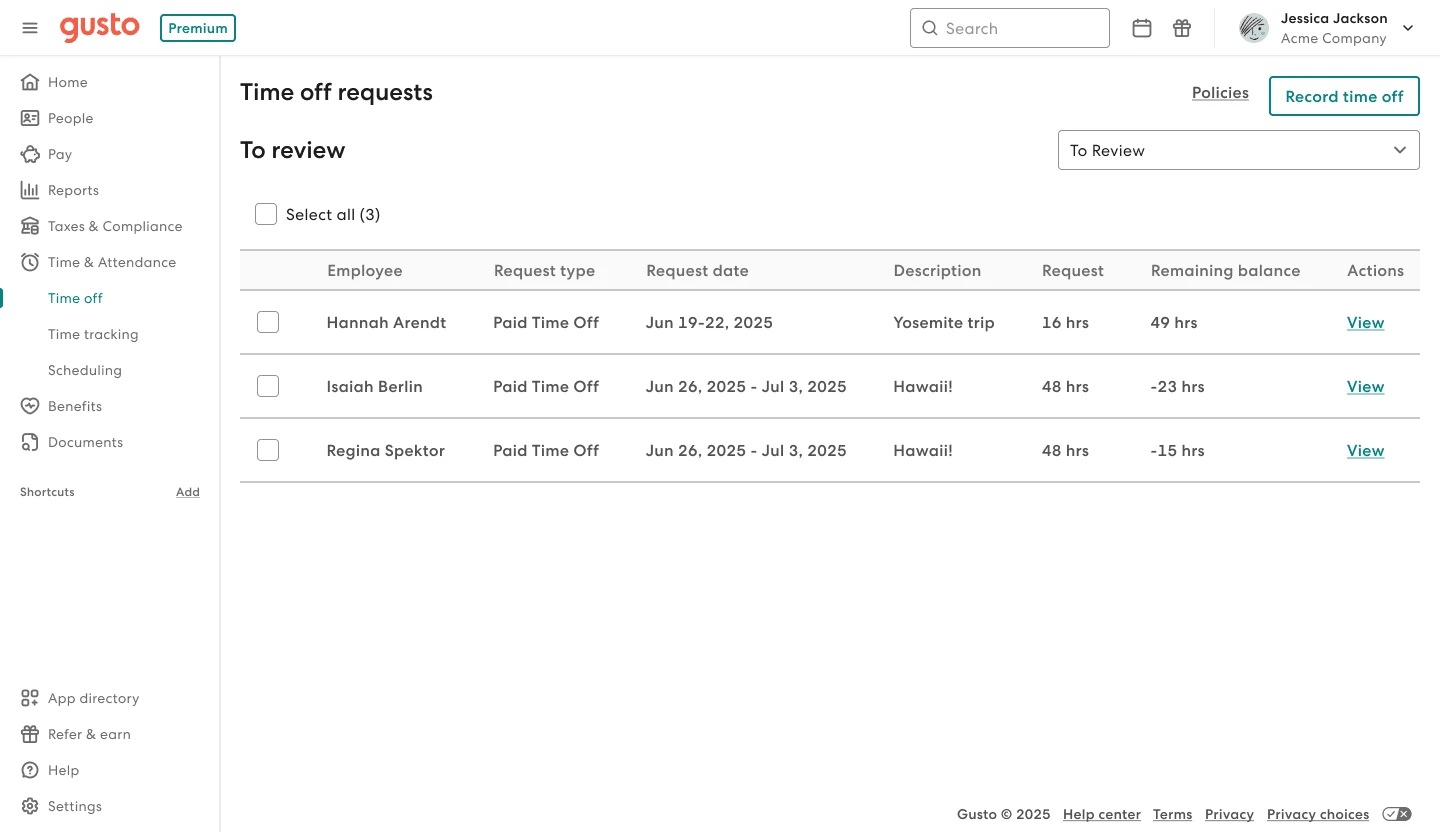
What to noticeThe example places request dates, hours and remaining balances in one table.
Try in your demoAsk the demo host to follow one request from review to its payroll handoff.
Vendor example showing Premium and June 2025 sample dates. Confirm availability in your chosen plan. Source: Gusto time tools · Image checked September 23, 2026. Official example, not our test account.
Our take
Is Gusto a good fit for your HR team?
Gusto earns a place on our shortlist for teams that want their next software decision to start with payroll. We like the clear progression between plans: choose around your workforce today, then weigh the extra capabilities against the work you want to improve. A focused demo is the best next step.
We checked Gusto’s published plans, pricing and help documentation, and explored its public hiring and payroll tours. These are guided vendor demos, not a live customer account. We have not run payroll, timed workflows or tested support. Vendor links are direct and contain no affiliate tracking.
Find the fit for your team.
What you want to improve
- You want to give a small HR team a clearer starting point for its payroll software decision.
- You are expanding across US states and want to compare the right plan before your next hire.
- You value a more supported rollout and want to explore whether Premium’s advisor service fits your team.
What to clarify first
- Build your quote around the options you will use, including any benefits services, so the full budget is clear from the start.
- Check the active employee count used for billing, especially if staffing changes through the year.
- Bring a real workflow to the demo and agree on support expectations. That is how you turn a promising fit into a confident choice.
Gusto plans: what your team actually needs.
Three US employee plans separate mainly on coverage: single state, multi state with time tracking, then advisor led service with custom reports and pay tools.
Simple
$49/month
+ $6 per person/month
A focused start for payroll in one state.
Plus
$80/month
+ $12 per person/month
More room for multi-state teams and time tracking.
Premium
$180/month
+ $22 per person/month
A closer support relationship as your needs grow.
| Your need | Simple | Plus | Premium |
|---|---|---|---|
| US payroll scope | One state | Multiple states | Multiple states |
| Unlimited payroll runs | Included | Included | Included |
| Time tracking & PTO approvals | Add-on: $6/person/mo | Included | Included |
| Next-day pay* | Add-on: $15 + $3/person/mo | Included | Included |
| Priority Support | Add-on: $30 + $3/person/mo | Add-on: $30 + $3/person/mo | Included |
| Dedicated Service Advisor | Not included | Not included | Included |
| Basic PTO policies | Included | Included | Included |
*Next-day pay is subject to eligibility. “Included” means in the plan subscription; wages, taxes and benefit premiums are separate. Rates and options · Time tools.
Published US rates checked September 19, 2026. Check current Gusto pricing
Use the official plan guide to confirm the capabilities included in your choice. This review covers the three employee plans; Solo and Contractor Only need a separate assessment.
What would Gusto cost for your team?
Choose your headcount and the help you need. Compare the employee plans with selected add-ons included, then take the estimate to your demo.
Employee plans only. Enter 1–500 employees; contractors need a separate quote.
For these needs, start with Plus · $380/monthLowest estimate among the three plans matching your selections.
Simple
$349/month
$4,188 over 12 months
- Simple base$49
- 25 employees × $6$150
- Time & Attendance Plus$150
Multi-state payroll needs Plus or Premium.
Plus
$380/month
$4,560 over 12 months
- Plus base$80
- 25 employees × $12$300
- Time & Attendance Plus · included$0
Lowest matching estimate
Premium
$730/month
$8,760 over 12 months
- Premium base$180
- 25 employees × $22$550
- Time & Attendance Plus · included$0
Matches selected needs
USD estimates at published rates checked September 19, 2026. Includes only the base plan and selected options above, charged for the full employee count. Excludes wages, payroll taxes, benefits premiums, other add-ons, contractors, promotions and any applicable charges. The 12-month figure assumes unchanged rates and headcount. Next-day pay is subject to eligibility. Confirm your final quote with Gusto.
Check rates and add-ons at GustoBase subscription at a glance
Estimate from the base fee plus the per person rate, then add the options you want. Multiplying a month by twelve assumes unchanged headcount and prices, an illustration rather than an annual contract.
| Active employees | Simple | Plus | Premium |
|---|---|---|---|
| 10 | $109 | $200 | $400 |
| 25 | $199 | $380 | $730 |
| 50 | $349 | $680 | $1,280 |
Calculation: monthly base + active employee count × per-person rate. Excludes add-ons, benefits premiums, wages, payroll taxes and any other applicable charges. No contractors or discounts included.
That is $4,560 over 12 months if rates and headcount stay constant. It is an illustration of subscription spend, not an annual contract or a complete employment budget.
Ask for a written quote that names each extra service. A plan can be a good fit and still need a separate budget for the benefits or support you choose.
From the task to the tool
Three moments in an HR team’s week.
Follow the handoffs that matter: a new hire, the next payroll and a time-off request. We explored Gusto’s public hiring and payroll tours; the time-off flow below is documented by Gusto.
A new colleague starts next week
Give every onboarding task an owner.
Gusto’s guided hiring tour brings job posts, offers and onboarding checklists into one journey. We inspected the checklist and its options for custom tasks and delegation.
Offer documents, payroll setup, employee invitation and assigned tasks.
Work email, app accounts and a workplace introduction.
Add the follow-up tasks your team needs.
- Prepare the checklist. The tour shows tasks grouped before, on and after day one, with the option to add and delegate tasks.
- Invite the new hire. Gusto’s help guide describes employee self-entry of personal, tax and payment details.
- Review the handoff. Check the completed details before approving the setup for payroll.
Plan to explore: Confirm the checklist customization and delegation included in your chosen plan. The public tour displays Premium.
Payday is approaching
Bring the hours into the payroll review.
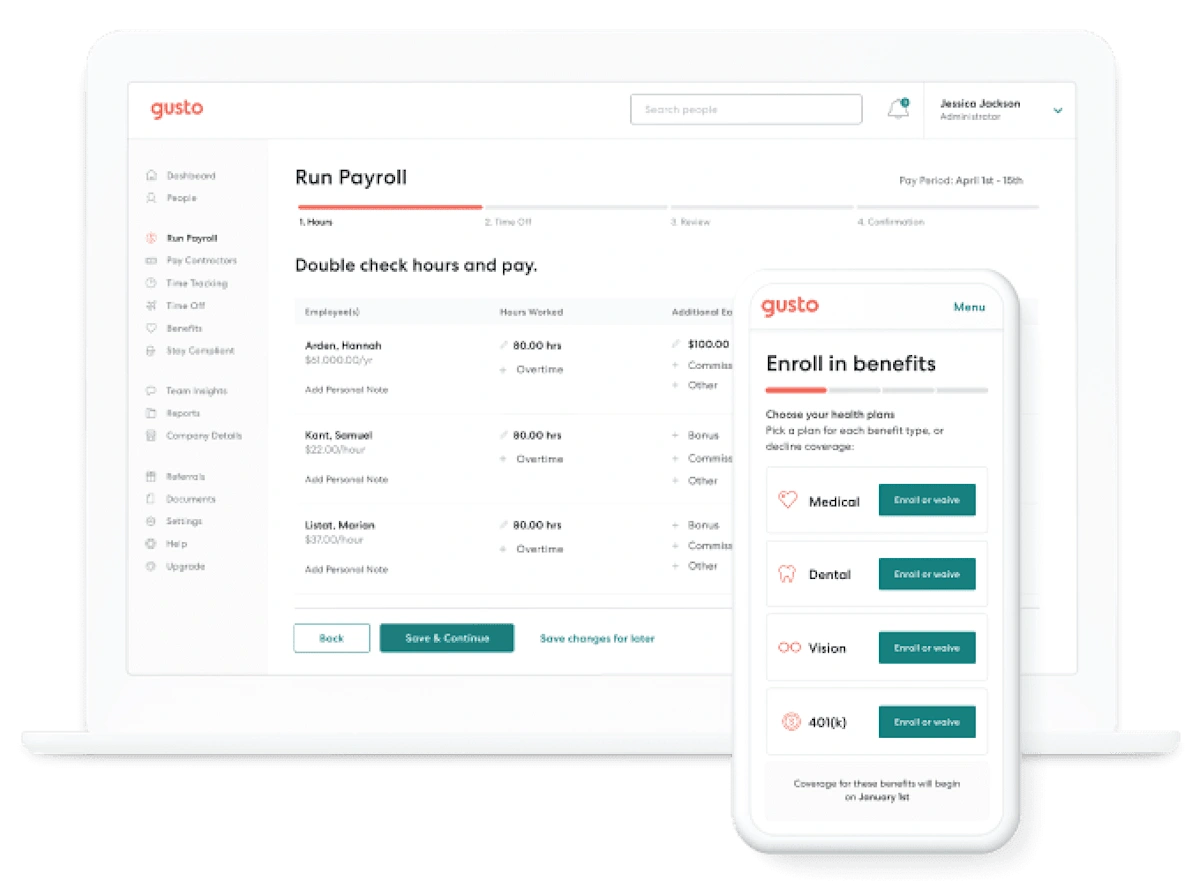
In the public payroll tour, we observed employee payroll details and fields for adjustments such as bonuses. Use that review step to check the inputs before any submission.
- Gather the inputs. Review approved hours and changes for the pay period.
- Check employee details. The tour exposes earnings and adjustment fields in the payroll table.
- Review the summary. Confirm the period, amounts and payment timing before submitting in a real account.
Plan to explore: All three employee plans cover payroll. Multi-state payroll needs Plus or Premium. Built-in time tools are included with Plus/Premium or available as an add-on with Simple.
Explore Gusto’s payroll tour · We did not submit a real payroll or measure processing time.
A time-off request arrives
Connect the approval to payroll.
Gusto's time tracking and time off feed approved hours straight into payroll, so the run reflects what managers already signed off. Screens are official illustrations.
Revisit the official time-off screen above.
- Review the request. Look at dates, requested hours and the remaining balance.
- Make the approval. Follow your team’s policy and confirm coverage.
- Check the payroll handoff. Gusto documents that approved time off syncs with payroll and calendars.
Plan to explore: Plus or Premium, or Simple with Time & Attendance Plus. Basic PTO policies in Simple are different from the full request-and-approval workflow.
Documentation walkthrough with a vendor screen; we have not submitted or approved a time-off request in a customer account.
After payroll onboarding, who teaches the new hire the work itself? The Trainual review and fictional SOP example help you prepare a separate training and process brief.
Gusto or ADP RUN?
Compare payroll support, package scope and a full-year budget with our new quote worksheet.
Explore Gusto vs ADP RUNAlready using QuickBooks Online?
Compare Intuit’s current Workforce plans with Gusto’s connected payroll workflow, including standalone subscription examples.
Explore Gusto vs QuickBooks PayrollA shortlist with a reason
Gusto, ADP or QuickBooks?
Start with the workflow you want to improve. These are comparison starting points based on each provider’s published scope, not head-to-head test results.
Keep Gusto on your shortlist.
Its published employee plans make it straightforward to build a starting budget. Use the calculator above to compare a single-state setup with the multi-state plans.
Compare your Gusto optionsCompare QuickBooks Payroll.
QuickBooks describes a connected setup for accounting, payroll, employee data and time tracking. Ask your accountant to compare that workflow with a Gusto integration, then price equivalent features.
Explore QuickBooks PayrollRequest an ADP RUN comparison.
RUN lists four packages, from Essential Payroll to HR Pro Payroll & HR. Request an itemized quote for your headcount and support needs; we have not verified a like-for-like price advantage over Gusto.
Explore RUN Powered by ADPOfficial provider pages checked September 19, 2026. Ask each provider to show the same payroll, onboarding and time-off scenario.
What customers say about Gusto.


Several visible reviewers appreciate self-service access to pay documents. Others describe friction with corrections or time-off handling; one raises concerns about extra charges. Use these experiences to shape a demo around your own team’s day.
A better start begins with a clear handoff.
Transfer automation supports QuickBooks Online and Desktop, ADP Run and Paychex, the last not offered to every user. It moves data only, and only during onboarding; deductions, contributions and pay items are set up separately.
Read Gusto’s payroll transfer guidance
A customer story, in context
Support can be part of the value.
Gusto’s Forge Fire story offers an encouraging example: the vendor reports that a 35-person US company reduced platform costs by 40% after moving to Premium. Gusto discloses compensation or a discount for the testimonial. We have not independently verified the result; use the story to shape your questions, rather than forecast your own savings.
Read the Forge Fire case studyAn AI task to try in your demo
Ask a payroll question you can verify.
Gusto documents an MCP server: ask questions against your people and payroll data, and trigger write actions that require confirmation. We have not tested it; the documentation is public.
Understand a change in payroll.
Example question to explore: “What changed between our last two payrolls?” This is a suggested evaluation prompt, not a result we have tested.
- What Gusto documents
- Questions grounded in payroll and people data, plus actions such as onboarding, time entry and payroll preparation.
- What to have ready
- An authorized Gusto account, an approved AI client and a payroll report you can compare with the answer. Confirm access and availability for your account.
- The human checkpoint
- Verify amounts against the report. Gusto says write actions require confirmation; its guidance also calls for manual approval of all tool use and an isolated Gusto connection.
Read Gusto’s AI connection and usage guidance · Documentation reviewed; connection and outputs not tested.
Find an AI approach for the task you haveMake your Gusto demo useful.
Bring one workflow that you would like to make easier. These questions turn a promising first impression into a decision your team can explain.
- Which states will we run payroll in next year?
- Which options do we need on day one, and which wait?
- How many onboarded employees will be billable each month?
- Which prior payroll records must move, and who reconciles them?
- Who approves AI actions, and within what limits?
Take the same brief to every demo.Use our scorecard to record answers, costs and open questions.
Get the scorecardStill building your shortlist? Explore US payroll software.
Your Gusto questions, answered.
How much does Gusto cost per month?
Simple starts at $49/month plus $6 per person; Plus at $80 plus $12; Premium at $180 plus $22. These published US subscription rates exclude optional services.
Read the sourceHow much does Gusto cost for 10 employees?
The base subscription calculates to $109/month on Simple, $200 on Plus or $400 on Premium. Add-ons and benefits premiums are extra if you choose them.
Read the sourceIs Gusto a good fit for a small business?
Our view: yes when payroll is US based and one plan matches your state coverage and reporting needs. Map those two, then weigh the total.
Our evaluation methodWhat is the difference between Gusto Simple and Plus?
Simple covers one state. Plus adds multi-state payroll and time tracking. Choose around where your team works and which tasks you want in your payroll setup.
Read the sourceDoes Gusto charge for each payroll run?
No. Runs are not billed individually. Billing follows active onboarded employees each month, whether or not you pay them in a cycle.
Read the sourceCan Gusto handle payroll in multiple states?
Yes, on Plus and Premium. If employees work in a second state, or will soon, start your comparison at that tier.
Read the sourceCan I pay contractors through Gusto?
Yes. US contractors are billed only in months you pay them. A contractor only plan exists separately and sits outside this review.
Read the sourceDoes Gusto integrate with QuickBooks and Xero?
The app directory lists QuickBooks Desktop, QuickBooks Online and Xero, sending data from Gusto to accounting. Confirm the exact edition and account mapping you need.
Read the sourceCan I switch to Gusto during the year?
Yes, and plan for it. Prior payroll records are needed, and year to date figures should be reconciled with whoever keeps your books first.
Read the sourceWhat support comes with Gusto?
Phone and chat support are available during business hours. Premium includes priority support and a dedicated service advisor. Confirm the support arrangements for your plan during your evaluation.
Read the sourceCan I explore Gusto before running payroll?
Yes. You can create an account for free and explore the product, with payment starting when you are ready to run payroll.
Read the sourceDoes Gusto offer AI features?
Gusto documents an AI connection to payroll and people data, covering actions like onboarding and time. We did not test it, so confirm permissions first.
Read the sourceIs Gusto or ADP cheaper?
That depends on your quote. Price the same scope both ways, headcount, states, options, support, then compare it with Gusto's published rates.
Read the sourceIs Gusto cheaper than QuickBooks?
Compare ongoing price after any promotional period ends, using the same headcount and features, then set that beside Gusto's published rates.
Read the sourceGusto or Deel for your next chapter?
Compare US payroll budgets, international hiring and the handoffs for a mixed team.
Explore our Gusto vs Deel comparisonReady to take a closer look?
If the plan fits your workforce and the demo answers your questions, Gusto is worth a place on your shortlist.
See Gusto’s demo Still deciding whether to keep, connect or replace?Considering a broader HR and IT platform?
 Compare Gusto and Rippling
 Sources and review method
Reviewed September 19, 2026. Pricing was checked on the live US pricing page in Chrome. Budget figures are our calculations. The customer anecdote comes from Gusto and carries its compensation disclosure. Public hiring and payroll demo screens were inspected. The onboarding diagram is our explanatory map; other product visuals are supplied by Gusto and credited alongside the images. No independent usability, payroll-accuracy or support benchmark was performed.
- Gusto pricing — checked on the live page
- Gusto Help: understanding the plans
- Gusto Help: payroll transfer automation
- Gusto: Forge Fire customer story and disclosure
- Gusto: AI integration overview