 Rippling
 Open full-size image ↗
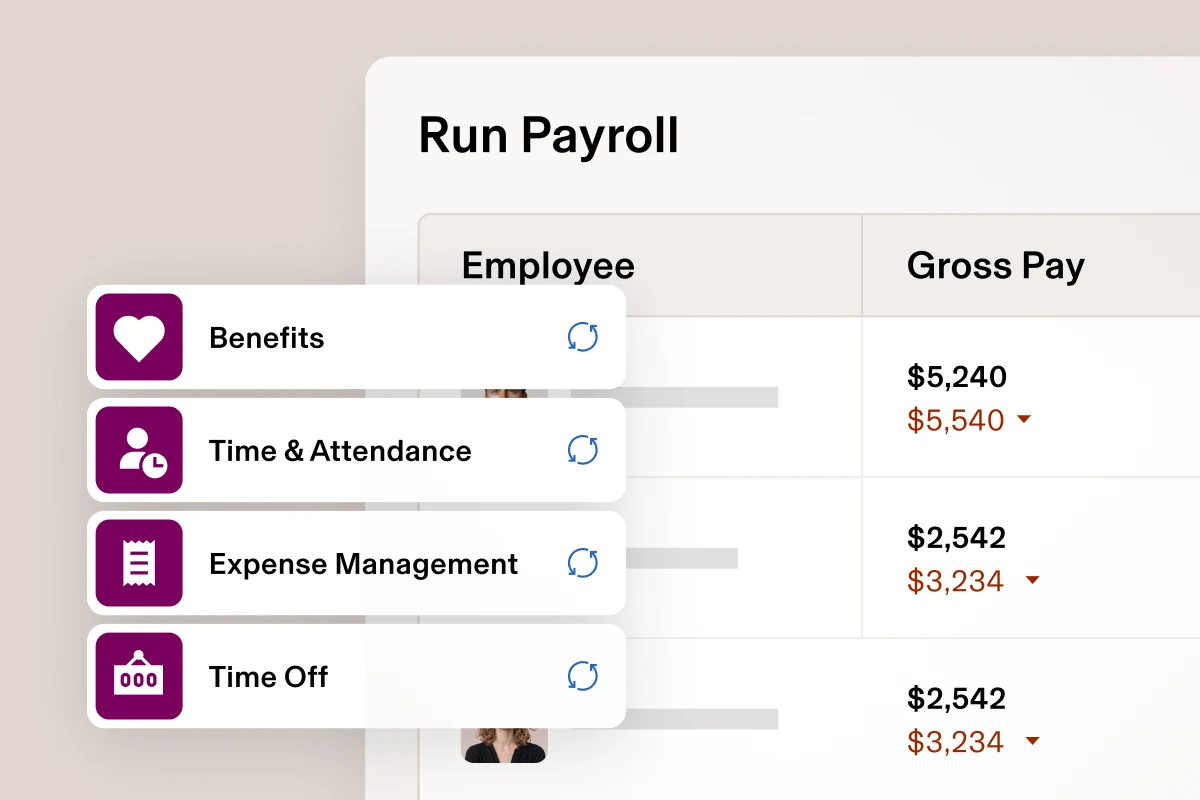
What to noticeThe vendor illustration groups four upstream inputs beside employee gross pay.
Try in your demoAsk the demo host to change an approved time entry and trace its effect on the draft pay run.
Official product illustration, not a complete live screen. Confirm which modules and approval steps are included in your proposal. Source: Rippling payroll · Image checked September 23, 2026. Official example, not our test account.
Choosing a foundation for a smaller team? Compare HRIS for small businesses with the same records, permissions and module brief.
01 / Your buying guide
Who Rippling fits
Fit here is a question of workflow, not company size. Rippling is a strong candidate when the same person or small team handles hiring, payroll, benefits enrollment, and app access, and when those steps currently live in separate tools that need manual copying. The shared employee record is what does the work, so the value grows with how many of those steps you actually run.
Distributed US teams are a common trigger. Rippling's remote workforce page states support for employees across all fifty states, which is a vendor claim worth confirming for your specific states and local taxes. Read it as a US statement rather than a promise about benefits elsewhere. If your staff sits in one state and one office, a simpler plan from another provider may cover you comfortably.
- Count the handoffs between systems you do each month, then judge fit on that number.
- List your states of employment and ask Rippling to confirm each one in writing.
- Headcount alone does not decide this: a ten person team with heavy onboarding can fit better than a settled fifty person office.
Make the proposal easy to compare
Rippling pricing: build your quote by module.
Rippling requires its core platform. Payroll, benefits and IT products are purchased alongside it. Most products use a monthly per-employee price, and some have a base fee. Request a written proposal for the combination you need.
Rippling pricing · checked September 26, 2026The examples below use 2, 10 and 25 employees. These are illustrative buying briefs, not minimum headcounts. Rippling’s pricing page does not provide a numeric payroll price; confirm the core platform fee, each selected module and any minimum commitment in your quote.
| Your example team | Request from Rippling | Confirm together |
|---|---|---|
| 2 employeesOne state · small salaried team | Core platform + US payrollWritten quote needed | Billable headcount, minimum commitment and setup fees |
| 10 employeesOne state · hourly team | Core platform + US payroll + selected time toolsWritten quote needed | Time approval, payroll export and the cost of each selected module |
| 25 employeesMultiple states · growing team | Core platform + US payroll + selected time and benefits productsWritten quote needed | State coverage, implementation and renewal terms |
What will we pay?
List the core fee, each module, billable headcount and minimums. Ask which charges change when someone joins or leaves.
What happens before payday?
Itemize migration, setup, training, parallel checks and who signs off the first payroll.
What happens next year?
Record the term, renewal rate, discounts, cancellation rules and access to your records when you leave.
Use the same scope to compare Gusto and Rippling for US payroll, BambooHR and Rippling for HR handoffs, or Paylocity and Rippling for a broader platform brief.
02 / Your buying guide
What the platform and payroll module cover
Rippling sells the core platform as a required purchase, then each HR, Finance, and IT product on top. Payroll is one of those products. On its payroll page, Rippling describes automatic calculation of federal, state, and local payroll taxes with filings sent to the matching agencies, pay run comparison against the previous run, and unlimited pay runs at no extra charge.
Two details help you scope a quote. Time and Attendance is a separate product, so integrated time tracking, where approved hours reach the pay run on their own, depends on buying it; if you track hours elsewhere, ask how those totals would arrive. Employee self-service covers pay stubs and tax forms, including for people who have left, and Rippling says it stores W-2 and 1099 copies on each profile.
- Ask which products are on the quote: platform, payroll, time, benefits, device management.
- Confirm whether local tax filings for each of your jurisdictions are included.
- Check that off-cycle and correction runs carry no separate fee.
03 / Your buying guide
Three workflows to walk through
Take a new hire, a midyear pay change, and an offboarding, and follow each one end to end. Rippling's permissions model is built on profiles that combine scope, data access, and allowed actions, and those profiles attach to attributes such as level or department rather than to individuals. Supergroups update membership as attributes change, so access follows a promotion or a transfer.
Approvals are the satisfying part to test in a demo. Rippling documents role-based routing using attributes like tenure and department, multi-approver chains, and rerouting when a primary approver is away. Ask to see a pay change approved by a manager who should see compensation but not Social Security numbers, then ask what the outgoing employee loses access to on the last day, and when.
- New hire: who approves, what gets provisioned, and what the manager can see.
- Pay change: which approval chain applies and where the change appears in the next pay run.
- Offboarding: timing of access removal, final pay, and document retention.
04 / Your buying guide
Switching and what to prepare
Rippling's pricing page says its team picks up payroll where your previous provider left off, importing and analyzing year to date payroll information so quarterly and annual filings stay accurate, and that you do not need to wait for January. That is the stated process rather than a timeline we have measured, so ask what the calendar looks like for the start date you have in mind.
Prepare the data side early. Rather than assuming a file format will work, ask your current provider for its export schema and sample files, then ask Rippling which fields it reads and which need manual mapping. Year to date wages, taxes withheld, benefit deductions, garnishments, and state registrations are the items that usually decide whether a midyear move goes smoothly.
- Request your current provider's export schema before you pick a start date.
- Reconcile year to date totals with whoever owns payroll today, against your last filed quarterly return.
- Confirm who registers and files in each state during the transition.
05 / Your HR edge
AI features and the controls around them
Rippling documents an assistant that works on live company data, with answers linking back to the underlying records so you can check them. Two design points are worth reading before you switch it on: responses follow the requesting user's existing permissions, and actions the assistant proposes need explicit human confirmation. Admins can enable or disable AI features and set data permissions.
Rippling also states that the assistant acts on third-party apps only through integrations already connected in Rippling. We have not tested these behaviors, so the useful check is a permissions one: ask a sensitive question from a manager account and confirm the answer stops where that manager's access stops, then open a linked record and compare the answer against the source.
- Test AI answers from a manager login, not only from an admin login.
- Write down which roles may confirm AI actions and which may only read.
- Open the linked source record and check the answer against it before relying on a summary.
06 / Your buying guide
What to ask in the demo
Call it a demo, because that is what it is: a guided walkthrough by a seller, and a good chance to bring your own data shape. Rippling's integrations page lists accounting connections including QuickBooks Online, Xero, NetSuite, and Sage Intacct, plus 401(k) syncing with payroll, single sign-on, and user provisioning. Ask which of your named tools are covered and at what depth.
Depth is the useful question. A logo on a page can mean single sign-on only, or full provisioning and attribute mapping. Ask whether the connection pushes changes both ways, which fields map, and what happens when a field is renamed. Then ask for the itemized quote in the same meeting, with the per employee price of each product and any monthly base fee shown separately.
- Name your accounting system and ask what syncs, in which direction.
- Ask for one live workflow built during the call, using your job titles.
- Leave with the quote itemized by product, per employee price, and base fees.
What customers say about Rippling.


A connected employee record
Savannah J. appreciates keeping employee information together and highlights the planning involved in setup and module selection.
September 2, 2026 · Incentivized, G2 invitation on behalf of the seller · ParaphraseA clearer IT checklist
Larry K. values connected employee and device information. His feedback is a useful reminder to check device prerequisites during a demo.
Updated August 24, 2026 · Incentivized, G2 invitation · ParaphraseConnecting hours to payroll? Explore our employee time tracking shortlist.
Still building your shortlist? Explore US payroll software.
Rippling: your questions, answered.
How much is Rippling payroll per month?
Rippling does not publish a payroll price. Its pricing page asks what services you need and returns a custom quote. The core Rippling Platform is a required purchase, and each product such as Payroll or Benefits is bought separately. Most products are billed per employee per month, and some carry or include a monthly base fee.
Read the sourceHow long does Rippling take to process payroll?
Rippling's payroll page describes running a pay run and having taxes calculated and filed automatically, but it does not publish a funding cutoff or a delivery time. Keep two things apart: preparing and approving the pay run, and money actually reaching employees. Ask Rippling to confirm, in writing, the cutoffs and pay delivery timing for your pay schedule.
Read the sourceIs Rippling suitable for a small US business?
It can suit small teams well, and workflow decides it more than headcount. Rippling's pricing page describes a required core platform plus each product purchased separately, so the question is how many of your monthly steps, onboarding, payroll, benefits, time, app access, would sit on one record. If several would, the fit is strong. If payroll alone is the job, price that module and compare.
Read the sourceWhich Rippling modules are required for payroll?
At minimum, the core Rippling Platform, which the pricing page describes as required, plus the Payroll product itself. Anything else, including Time and Attendance, Benefits Administration, or device management, is purchased separately. Write the list you need on one line before the sales call, then ask for each item to appear as its own line on the quote.
Read the sourceIs time tracking included in Rippling payroll?
Not automatically. Rippling documents Time and Attendance as its own product, with clock-in by mobile, web, or a physical device, job costing, and break and overtime alerts. Buying it is what lets approved hours flow into the pay run for review, which is the benefit of pairing them. If you already track hours elsewhere, ask how those totals would reach payroll.
Read the sourceCan Rippling handle employees in multiple US states?
Rippling states on its remote workforce page that it supports employees in all fifty states. That is the vendor's claim, and it is a reasonable starting point for a distributed US team. Bring your actual list of states and any local jurisdictions to the demo, and ask which registrations you must hold yourself and which filings Rippling submits.
Read the sourceDoes Rippling support contractor payments?
Yes. Rippling's payroll page says you can pay employees and contractors, and points to its global payroll product for people working outside the US. Coverage and cost vary by country, so ask for the specific places you hire, the per contractor rate, any currency or transfer fees, and which tax documents Rippling produces at year end.
Read the sourceWhich accounting tools can Rippling connect to?
Rippling's integrations page names QuickBooks Online, Xero, NetSuite, and Sage Intacct among its accounting connections, alongside 401(k) providers that sync with payroll. The page also describes single sign-on, user and role provisioning, and custom integrations built with its developer kits. Ask how journal entries are mapped to your chart of accounts before you commit.
Read the sourceWhat data is needed to switch to Rippling?
Rippling's pricing page says its team imports and analyzes your year to date payroll information so quarterly and annual taxes stay accurate. It does not publish a field list, so treat this as our checklist rather than confirmed import mapping: wages, taxes withheld, deductions, garnishments, employee records, state registrations. Ask your current provider for its export schema, then ask Rippling which fields map automatically.
Read the sourceCan Rippling manage employee devices and app access?
Yes, as separately purchased IT products. Rippling documents provisioning and deprovisioning tied to role changes, single sign-on, multi-factor enforcement, and group management across connected apps, plus device management for Macs and Windows with encryption enforcement and remote lock or wipe. Whether you need this depends on who handles IT today, not on your headcount.
Read the sourceWhat should an HR team verify before enabling AI features?
Check three things against Rippling's own statements, then test them yourself: that AI answers respect each user's existing permissions, that actions the assistant proposes require explicit human confirmation, and that admins can enable or disable features and set data permissions. Ask a sensitive question from a manager account, then open the linked record to confirm the answer matches its source.
Read the sourceWhen should a business choose Gusto instead of Rippling?
Gusto is worth a close look when your needs are payroll, benefits, and straightforward time tracking, and you want a published price. Simple is $49 per month plus $6 per person for single-state payroll, and Plus at $80 plus $12 per person adds multi-state payroll and time tracking, checked September 19, 2026. Rippling is worth evaluating when IT modules such as app provisioning matter.
Read the source Compare the other sourceTake your brief to Rippling.
Explore the service that matches your team, then confirm modules, country coverage and pricing in your demo.
Hiring globally, considering a PEO or managing devices?
Affiliate links: we may earn a commission on eligible referrals. Our commercial relationships.
Your next step
A better brief makes a better demo.
 Read the Gusto review
 Compare BambooHR and Rippling around your HR and IT handoffs.
Sources and method
Reviewed September 19, 2026 for US buyers, using official product and pricing documentation. Fit recommendations and demo exercises are editorial judgments, not measured product results. Budget scenarios are illustrations; a written proposal determines your actual service scope and fees.
Two questions about payroll pricing and processing time were observed in Google’s People also ask results through DataForSEO. The other ten are editorial questions informed by the buying brief. We have not tested a live customer account or measured an AI performance advantage.
- rippling.com · remote workforce management
- rippling.com · payroll
- rippling.com · permissions
- rippling.com · pricing
- rippling.com · ai
- rippling.com · integrations
- rippling.com · time and attendance
- rippling.com · identity access management
- gusto.com · pricing
Planning a review cycle? Compare performance review software, feedback visibility and follow-up actions.